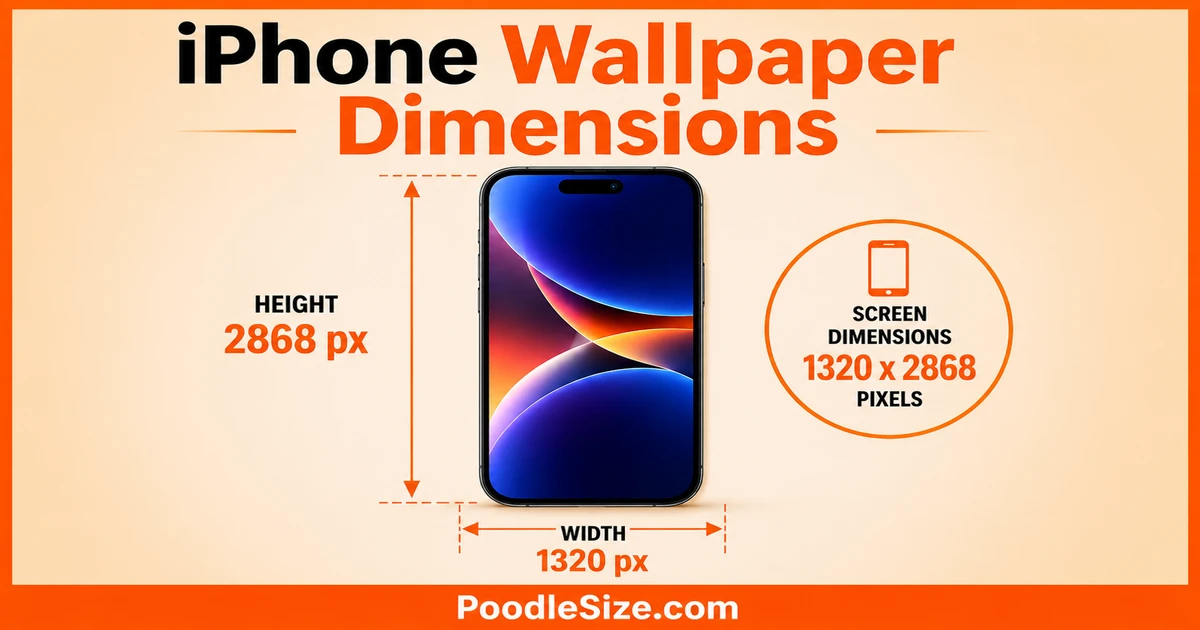
Choosing the right iPhone wallpaper size prevents blurry, stretched, or cropped backgrounds. This guide includes the exact wallpaper dimensions, resolutions, and model chart for every iPhone in 2026.
This guide covers every exact iPhone wallpaper size from the iPhone SE to the iPhone 17 Pro Max so your screen always looks flawless.
iPhone Wallpaper Dimensions for Every Model (2026)
iPhone 17 Series Wallpaper Size
| Model | Resolution | PPI | Aspect Ratio |
|---|---|---|---|
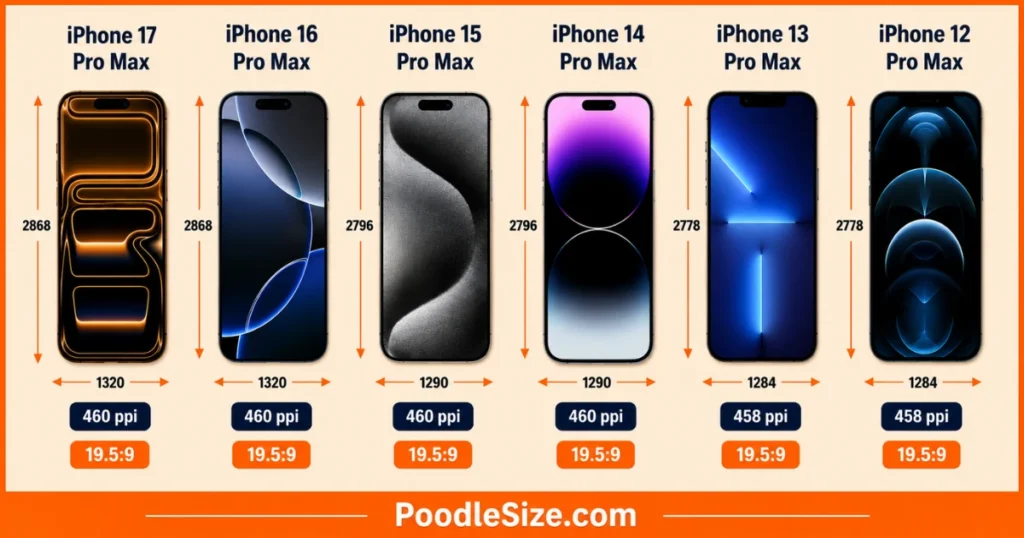
| iPhone 17 Pro Max | 1320×2868 | 460 | 19.5:9 |
| iPhone 17 Pro | 1206×2622 | 460 | 19.5:9 |
| iPhone 17 | 1179×2556 | 460 | 19.5:9 |
iPhone 16 Series Wallpaper Dimensions.
| Model | Resolution | PPI | Aspect Ratio |
|---|---|---|---|
| iPhone 16 Pro Max | 1320×2868 | 460 | 19.5:9 |
| iPhone 16 Pro | 1206×2622 | 460 | 19.5:9 |
| iPhone 16 Plus | 1290×2796 | 460 | 19.5:9 |
| iPhone 16 | 1179×2556 | 460 | 19.5:9 |
iPhone 15 & 14 Series Wallpaper Size
| Model | Resolution | PPI | Aspect Ratio |
|---|---|---|---|
| iPhone 15 Pro Max | 1290×2796 | 460 | 19.5:9 |
| iPhone 15 Pro | 1179×2556 | 460 | 19.5:9 |
| iPhone 15 Plus | 1290×2796 | 460 | 19.5:9 |
| iPhone 15 | 1179×2556 | 460 | 19.5:9 |
| iPhone 14 Pro Max | 1290×2796 | 460 | 19.5:9 |
| iPhone 14 Pro | 1179×2556 | 460 | 19.5:9 |
| iPhone 14 Plus | 1284×2778 | 458 | 19.5:9 |
| iPhone 14 | 1170×2532 | 460 | 19.5:9 |
iPhone 13, 12 & Older Models
| Model | Resolution | PPI | Aspect Ratio |
|---|---|---|---|
| iPhone 13 Pro Max | 1284×2778 | 458 | 19.5:9 |
| iPhone 13 Pro | 1170×2532 | 460 | 19.5:9 |
| iPhone 13 | 1170×2532 | 460 | 19.5:9 |
| iPhone 13 mini | 1080×2340 | 476 | 19.5:9 |
| iPhone 12 Pro Max | 1284×2778 | 458 | 19.5:9 |
| iPhone 12 Pro | 1170×2532 | 460 | 19.5:9 |
| iPhone 12 | 1170×2532 | 460 | 19.5:9 |
| iPhone 12 mini | 1080×2340 | 476 | 19.5:9 |
| iPhone 11 Pro Max | 1242×2688 | 458 | 19.5:9 |
| iPhone 11 Pro | 1125×2436 | 458 | 19.5:9 |
| iPhone 11 | 828×1792 | 326 | 19.5:9 |
| iPhone XS Max | 1242×2688 | 458 | 19.5:9 |
| iPhone XS | 1125×2436 | 458 | 19.5:9 |
| iPhone X | 1125×2436 | 458 | 19.5:9 |
| iPhone XR | 828×1792 | 326 | 19.5:9 |
| iPhone SE (3rd Gen) | 750×1334 | 326 | 16:9 |
Aspect Ratios, Safe Zones & Dynamic Island
What Aspect Ratio Does iPhone Use
Since the iPhone X, Apple has used a taller 19.5:9 aspect ratio, replacing the older 16:9 format and providing more vertical space for wallpaper designs.
Although newer Pro models vary slightly, designing wallpapers for a 19.5:9 ratio ensures compatibility across nearly all modern iPhone models.
Dynamic Island & Notch Dead Zones
On iPhones with the Dynamic Island, keep important wallpaper elements at least 200 pixels from the top edge to avoid overlap with system animations and notifications.
For the best Lock Screen layout, also avoid placing key content within the bottom 300 pixels, where iOS gestures and notifications can obscure the image.
The Parallax Effect and Extra Pixels
iOS uses a parallax effect that slightly moves wallpapers as you tilt your iPhone, causing the image to be cropped beyond the visible screen area.
To avoid edge cutoffs, add a 100–200 pixel margin around your wallpaper, or enable Reduce Motion to disable parallax and display the image without extra cropping.
How to Find Your iPhone Wallpaper Dimensions
Check Your Model in Settings
Open Settings → General → About and check the Model Name to identify your exact iPhone model in seconds.
Once you know the model, you can match it to the correct iPhone wallpaper dimensions for a precise, perfectly fitted wallpaper.
Use the Screenshot Trick
Take a screenshot and check its pixel dimensions in the Photos app to instantly find your device’s exact iPhone wallpaper resolution.
If the screenshot is 1179×2556 pixels, your ideal wallpaper size is 1179×2556 pixels, ensuring a perfect fit without using a size chart.
Resize With Canva or Adobe Express
Canva and Adobe Express make it easy to resize images to exact iPhone wallpaper dimensions by allowing custom pixel inputs for any device model.
For the best image quality on Retina displays, export wallpapers as PNG, which preserves sharpness and avoids JPEG compression artifacts.
Pro Tips for a Perfect iPhone Wallpaper
The One Universal Size That Works on All Models
1290×2796 pixels is the most versatile iPhone wallpaper dimension, matching the native 19.5:9 aspect ratio used by many recent iPhone models.
This resolution scales cleanly to smaller screens, making it a reliable universal wallpaper size that maintains image quality without requiring multiple exports.
Why 1920×1080 Fails on iPhone
1920×1080 pixels uses a 16:9 landscape aspect ratio, making it too wide for modern iPhone wallpaper dimensions and causing significant image cropping.
When used on an iPhone, iOS displays only the center portion of the image, often cutting off up to 40% of the width and disrupting the original composition.
Fixing Instagram Photos for iPhone Wallpaper
1080×1350 pixels uses a 4:5 aspect ratio, which is too short for most iPhone screens and can cause cropping or black bars when used as a wallpaper.
To fit iPhone wallpaper dimensions, extend the canvas to 1080×2340 pixels and add matching background space to preserve the original image without cropping.
FAQ’s About iPhone Wallpaper Dimensions
What are the dimensions for an iPhone wallpaper?
Modern iPhone wallpaper dimensions range from 1179×2556 pixels on the iPhone 16 and iPhone 15 up to 1320×2868 pixels on the iPhone 17 Pro Max and iPhone 16 Pro Max. The universally recommended safe size covering most active iPhone models in the USA is 1290×2796 pixels.
What size wallpaper does the iPhone 17 use?
The Apple iPhone 17 uses 1179×2556 pixels at 460 PPI, while the iPhone 17 Pro Max uses 1320×2868 pixels at the same density. Both models feature the Dynamic Island cutout, so keep important wallpaper content at least 200 pixels from the top edge of the canvas.
How do I find my iPhone’s exact wallpaper size?
Go to Settings → General → About and match your Model Name to the resolution chart above for an instant answer. Alternatively, take a screenshot, open it in Photos, and tap the info icon — the displayed pixel dimensions are your exact native iPhone screen resolution.
Is 1920×1080 good for iPhone wallpaper?
No — 1920×1080 is a landscape 16:9 widescreen format built for horizontal displays, not for iPhone’s tall vertical portrait screen. iOS crops approximately 40% of the image width when this format is applied as a wallpaper, leaving only the center strip visible.
What is the best universal iPhone wallpaper size?
1290×2796 pixels at 19.5:9 is the best universal iPhone wallpaper size for covering the widest range of current models. It natively matches four major iPhone display variants and scales cleanly to all remaining current-generation devices via iOS bicubic downsampling.
Does the Dynamic Island affect wallpaper design?
Yes — the Dynamic Island on iPhone 14 Pro through iPhone 17 Pro models creates a pill-shaped dead zone at the top center of the display. Keep your wallpaper’s focal element at least 200 pixels from the top edge to prevent the Dynamic Island’s live activity interface from overlapping your composition.
What aspect ratio does iPhone use for wallpapers?
All iPhone models from the iPhone X onward use a 19.5:9 aspect ratio for wallpapers, which is significantly taller than the old 16:9 format used on iPhone 8 and earlier. The only exception currently sold new is the iPhone SE (3rd generation), which still uses the older 16:9 ratio at 750×1334 pixels.
Why does my wallpaper look blurry on iPhone?
Wallpaper blur on iPhone is almost always caused by using an image with a resolution lower than your device’s native pixel count — iOS stretches the image to fill the screen, and that upscaling process degrades sharpness. Match your wallpaper to your model’s exact iPhone wallpaper dimensions from the table above and the blur disappears completely.
Can I use the same wallpaper on iPhone 15 and iPhone 16?
The Apple iPhone 15 and Apple iPhone 16 both share 1179×2556 pixels at 460 PPI, so any wallpaper sized for one works perfectly on the other. The iPhone 15 Pro Max and iPhone 16 Plus also share 1290×2796 pixels, making cross-generation wallpaper reuse straightforward across these matching pairs.
How do I resize a photo to fit iPhone wallpaper?
Open Canva, create a custom canvas at your iPhone’s exact pixel dimensions, upload your photo, and export as PNG. You can also use Snapseed directly on your iPhone to crop to a 9:19.5 ratio before importing into wallpaper settings.
What is the iPhone SE wallpaper size?
The Apple iPhone SE (3rd generation) uses 750×1334 pixels at a 16:9 aspect ratio — completely different from every other currently sold iPhone. Always prepare a separate 750×1334 pixel wallpaper variant for iPhone SE users, as 19.5:9 format wallpapers crop severely on this model’s older display format.
Is 4:3 or 16:9 better for iPhone wallpaper?
Neither 4:3 nor 16:9 works well for modern iPhones, which use a 19.5:9 aspect ratio significantly taller than both formats. A 16:9 image gets cropped on the sides, while a 4:3 image forces iOS into severe center-zoom cropping — both produce wallpapers that look unintentionally abstract and compositionally broken on current iPhone displays.
Conclusion
Getting your iPhone wallpaper dimensions right is a five-minute fix that makes an immediately visible difference in screen sharpness and composition quality. Start with 1290×2796 pixels as your universal safe size, use Canva or Adobe Express to resize, and always export as PNG for the cleanest result on any Retina display iPhone. Whether you’re personalizing the latest Apple iPhone 17 Pro Max or a refurbished iPhone 11, matching the native resolution is the single step that separates a sharp, polished Lock Screen from a blurry, cropped one.

Hi, I’m Stella Quinn, the admin at PoodleSize.com. We simplify measurements with quick conversions, easy guides, and real-life size comparisons to help you find accurate answers fast.